Content:
If you have ever clicked a link and instantly ended up at a different address without making any extra clicks, you have encountered a redirect in action. For a regular user, it’s magic, but for you and me, it’s a precise tool for managing a website’s “health”.
A redirect is an automatic forwarding of users and search bots from one URL to another.
To understand it more deeply, imagine a teleport analogy: you walk through one door and a moment later you find yourself somewhere else, with no need to click or choose anything extra. A redirect does the same thing. Properly configured forwarding implements an “invisibility logic”: for the user, the transition is seamless, while for the server, it’s strict compliance with data transfer protocols.
In the architecture of the modern web, there is a tool that works like an invisible yet flawless traffic controller at an overburdened intersection. When a requested resource is moved, this “controller” instantly and without unnecessary questions directs the data flow to the new address.
What is a redirect for an SEO specialist? First and foremost, it is a way to manage link equity and crawl budget. Without it, any site restructuring would turn into a technical disaster with lost rankings and traffic. Read more about usage below.
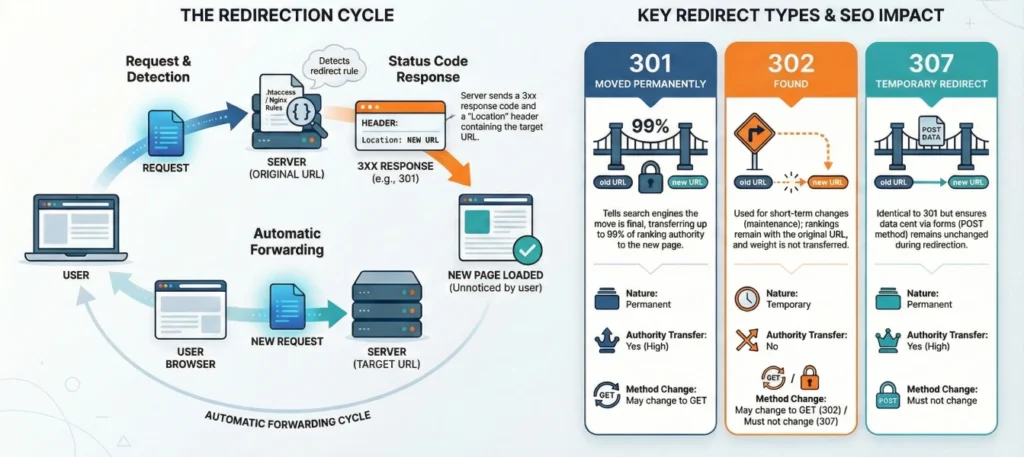
To understand how a redirect works, it is important to consider a feature of the HTTP protocol. The protocol does not store information about previous requests. Each browser request is processed separately, and the server must provide an unambiguous response. If the requested resource has been moved, the server reports this using special HTTP status codes and specifies the new URL to which the client should request.

Server functions for 3xx responses:
The codes start with “3” because that digit is reserved in the HTTP 1.1 standards for redirects, indicating to the client that additional actions are required to complete the operation.
Choosing the correct code is the foundation of technical optimization and SEO. A mistake in the redirect type can lead to the search engine not transferring the accumulated authority to the new page. Let’s review all types of redirects.
| Code | Name | Type | Equity transfer (SEO) | When to use (Case Study) |
| 300 | Multiple Choices | Multiple | No | Wikipedia analogy: letting the user choose a language version or file format. |
| 301 | Moved Permanently | Permanent | Yes (90-99%) | A complete move to a new domain or a permanent change in URL structure. |
| 302 | Found | Temporary | No | Maintenance, temporary campaigns. The bot keeps the old URL in the index. |
| 303 | See Other | Special | No | 303 redirect—what is it? It’s a way to send users to a different page after a POST request (for example, after paying for an order). |
| 304 | Not Modified | Caching | N/A | Tells the browser that the content has not changed. Critically important for saving crawl budget. |
| 305 | Use Proxy | Proxy | No | Access to the resource is possible only through the specified proxy server (an obsolete standard). |
| 306 | Switch Proxy | Reserved | No | 306 redirect is reserved by the protocol and is not used in modern practice. |
| 307 | Temporary Redirect | Temporary | No | A clarified 302 for HTTP 1.1. It strictly preserves the request method (POST stays POST). |
| 308 | Permanent Redirect | Permanent | Yes | A modern counterpart to 301. Used where it’s important to preserve the data transfer method (e.g., API). |
On the nuances:
The difference between them is easiest to understand through a real-estate analogy. 301 is buying a new home. You move away from the old address permanently, take your belongings, and all mail / purchases are now delivered to the new home.

302 is renting an apartment while renovations are happening. You plan to return, so delivery services (and the search engine) continue to treat your old address as the primary one. A comparison of 301 and 302 redirects:
| Criterion | 301 (Permanent) | 302 (Temporary) |
| Duration | Moved permanently | Moved temporarily |
| Indexing | Google replaces the old URL with the new one | The old URL remains in the index |
| Link equity | Transferred at 90–99% | Practically not transferred |
| Caching | The browser caches the address permanently | Not cached (a server request each time) |
Rule of thumb:
A professional seo redirect is always implemented at the server level. Client-side methods (browser-based) are workarounds that may not be recognized by search bots.
This is the cleanest method. The server announces the move before the browser starts rendering.
# Merging mirrors: redirect from www to non-www
RewriteEngine On
RewriteCond %{HTTP_HOST} ^www\.(.*)$ [NC]
RewriteRule ^(.*)$ https://%1/$1 [R=301,L]
Any typo in the .htaccess file will instantly crash the site into a “500 Error”. Always make a backup before editing!
location /old-page {
    return 301 /new-page;
}// Important: the 301 status is passed as the third parameter
header("Location: https://site.com/target-url", true, 301);
exit();If there is no access to the server, a redirect on javascript or Meta Refresh is used.
<meta http-equiv="refresh" content="0; url=https://new-site.com/">window.location.replace("https://new-site.com/");Risk: JS redirects are slow, increase TTFB (Time to First Byte), and may be ignored by other search engines (except Google), which is disastrous for site redirect.
If you need to quickly set up redirect links or bulk rules, use plugins/modules in WordPress, OpenCart, Shopify, and other platforms. For a major migration, lock the final rules on the server.
In capable hands, url forwarding solves key business tasks:
The wrong redirect code can crash a site’s rankings in search results.
Checklist (Pre-production):
To understand whether a redirect on a website is configured correctly, you need to use professional SEO software.
Here you can download a presentation (report) on the topic of the article.
Google recommends keeping a 301 redirect for at least one year. The search engine needs time to fully rebuild the index and reassign all external links.
Yes. Along with link equity, negative signals are transferred as well. If you are trying to save a site from a penalty with a simple move, it won’t work.
If the page is no longer needed by users, use only a 301 redirect. If both pages must be accessible, but one is higher priority, use canonical.
On WordPress, use the Redirection plugin. It lets you manage redirects through the admin panel without touching server files.
Officially, no. A 302 redirect is a temporary measure. Over time, Google may start treating it like a 301 if it remains in place for years, but it’s better not to rely on the goodwill of search algorithms.
Enjoyed the article?

Discover ideas worth your time — stories,
trends, and tools that shape the future
Join our newsletter for curated
insights and important updates