Short answer: in most cases Google itself regularly rereads sitemap.xml, so whether you need to resubmit a sitemap depends on the situation. If you made major changes (in bulk: new URLs, removal of old ones, redirects, changing the domain/protocol), resubmitting the sitemap in Google Search Console is indeed justified.
Important: sitemap.xml is not a “speed up the index” button. It is a “route map” for the bot. If pages are closed from indexing, return errors, or have an incorrect canonical, one resubmission will not save you.
Sitemap (most often sitemap.xml) is a file with a list of URLs that you want to show to the search engine for crawling. It helps when:
Sitemap formats can be different, but in SEO they most often use:
Role for indexing: the sitemap is a signal about which pages exist and which were updated, but the final decision about indexing is made by Google taking into account quality, availability, crawl budget, and internal signals.
When you connect sitemap xml and GSC, Googlebot:
Conclusion: sitemap and indexing of pages after changes are related, but not linearly. The page map helps to “inform” the search engine, not to “force” it to do.
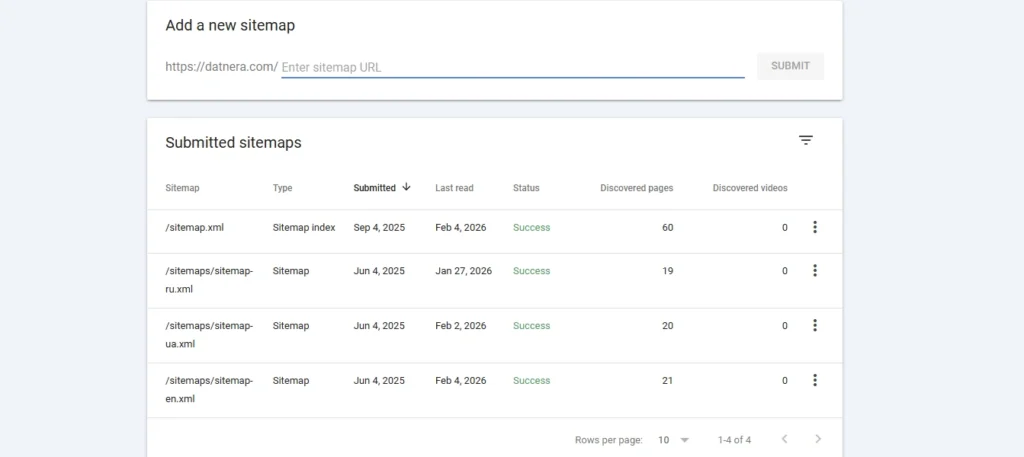
To understand whether the file is fresh and whether Google reads it, check:
If you have not indexing updates via sitemap xml, proceed step by step:
Sitemap: https://site.com/sitemap.xmlhttps://www.google.com/ping?sitemap=https://site.com/sitemap.xmlPing is a notification, not an accelerator. Google may ignore frequent “pings”.
If you are unsure whether you need to submit sitemap.xml after changes, focus on the scale of the changes. Resubmission is justified in cases:
| Situation | Why this matters | What to do |
| Added many pages (catalog, filters, blog) | A quick signal about new URLs is needed | Update the file and submit it in GSC |
| Removed pages or closed a section | So that Google stops planning them for crawling faster | Remove the URL from the sitemap, check 404/410 or redirect |
| Made redirects (URL change, migration) | You need to “reassign” crawl routes | Update the links in the indexing map to the final URLs (without chains) |
| Changed the structure of the site | It is easier for the bot to “read the map” again | when you need to submit the sitemap again is exactly such a case |
| Changed the domain or protocol (http→https) | Old URLs become irrelevant | Create a new site map for the new host and send it to the new GSC property |
| Fixed errors in the sitemap (broken URLs, 404, incorrect format) | Before the fix, Google could ignore the file | Resubmit and check “Success” |
A common situation: “we slightly updated the texts, do we need to submit the sitemap after edits?” Usually no. If:
Why so: Google itself periodically re-requests the sitemap and chooses what to crawl based on priorities and resources. Therefore, after edits on the site or pages, manual actions are not always required.
To the question of whether updating the sitemap affects indexing, the correct answer is: yes, but if conditions are met. Resubmission can help faster “deliver” new URLs if:
Myth: “the more often you resubmit a sitemap, the faster the site is indexed”.
Reality: frequent resubmission without real changes is noise. Google may not speed up, and you waste time on routine instead of eliminating the causes (errors, weak signals, quality, structure).

An online store updated category URLs (internal linking + new SEF URLs), but left old addresses in the site map. Result: in GSC, “discovered, but not indexed” increased, and Googlebot spent crawling on redirects. Solution: updated the sitemap (only final URLs), removed chains, checked robots.txt, then resubmitted the site map in Google. After several crawling updates, the share of redirects in crawling decreased, and new URLs began to get into the index more steadily.
Use the rule: we resend only when the list of pages or technical availability changes. In other cases, it is more effective to invest in page quality, internal linking, and fixing crawl errors.

No. If edits do not change URLs and do not affect the structure, Google will reread the file itself. Resubmit when changes are massive or technical.
If you added many pages, yes, submitting the sitemap after changes is useful. If it is 1–5 pages, correct internal linking and the fact that the site map is already connected are enough.
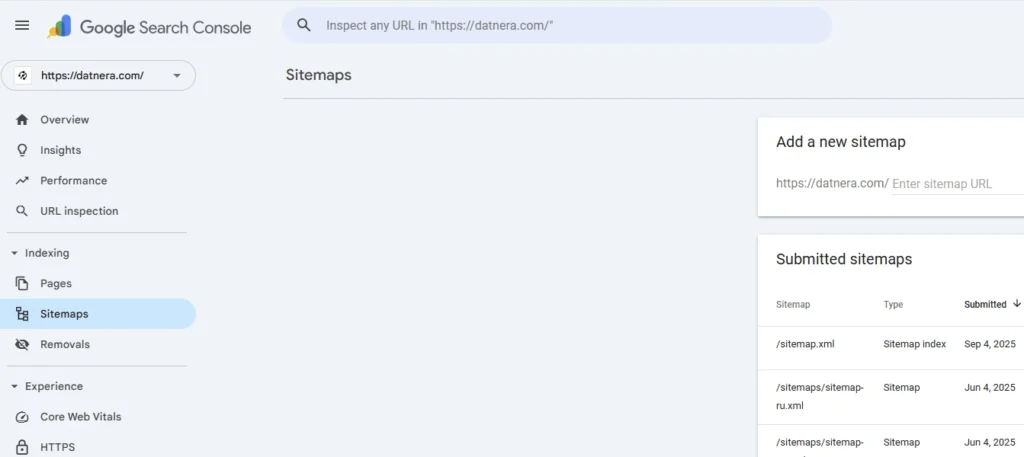
In Google Search Console, open the “Sitemap files” section—there you will see Last read (the date of the last processing) and the status.
Check availability via HTTPS, response code 200, absence of authorization/blocks, file size, XML correctness. Then perform resubmission and review errors in the report details.
In GSC → “Sitemap files”: Success —the file is read; Error—a critical problem (unavailable/broken format); Warning —the file is read, but there are nuances (for example, certain URLs with errors)
If the site runs on HTTPS, bring the site map to HTTPS and specify the HTTPS URL in robots.txt and in GSC. For modern projects, mixing protocols often leads to unnecessary redirects and confusion.
Because a sitemap is not a guarantee of indexing. Check: noindex/robots, 4xx/5xx errors, duplicates/canonical, content quality, weak internal linking, “thin” pages, and crawl budget limitations.
There is no exact frequency: it depends on the site size, trust, update frequency, and crawl resources. Usually Google visits regularly, but not on a schedule “every day at 12:00”.
Compare
Enjoyed the article?

Discover ideas worth your time — stories,
trends, and tools that shape the future
Join our newsletter for curated
insights and important updates